#Cloudflare launches Search for Agents in beta on all plans
On November 25, 2026, Cloudflare launched Search for Agents in beta for every plan, Free included. The announcement and changelog entry describe a switch that indexes your site and opens a search endpoint at /.well-known/search on your own domain. The setup guide lists the default settings.
#What the Search for Agents switch sets up
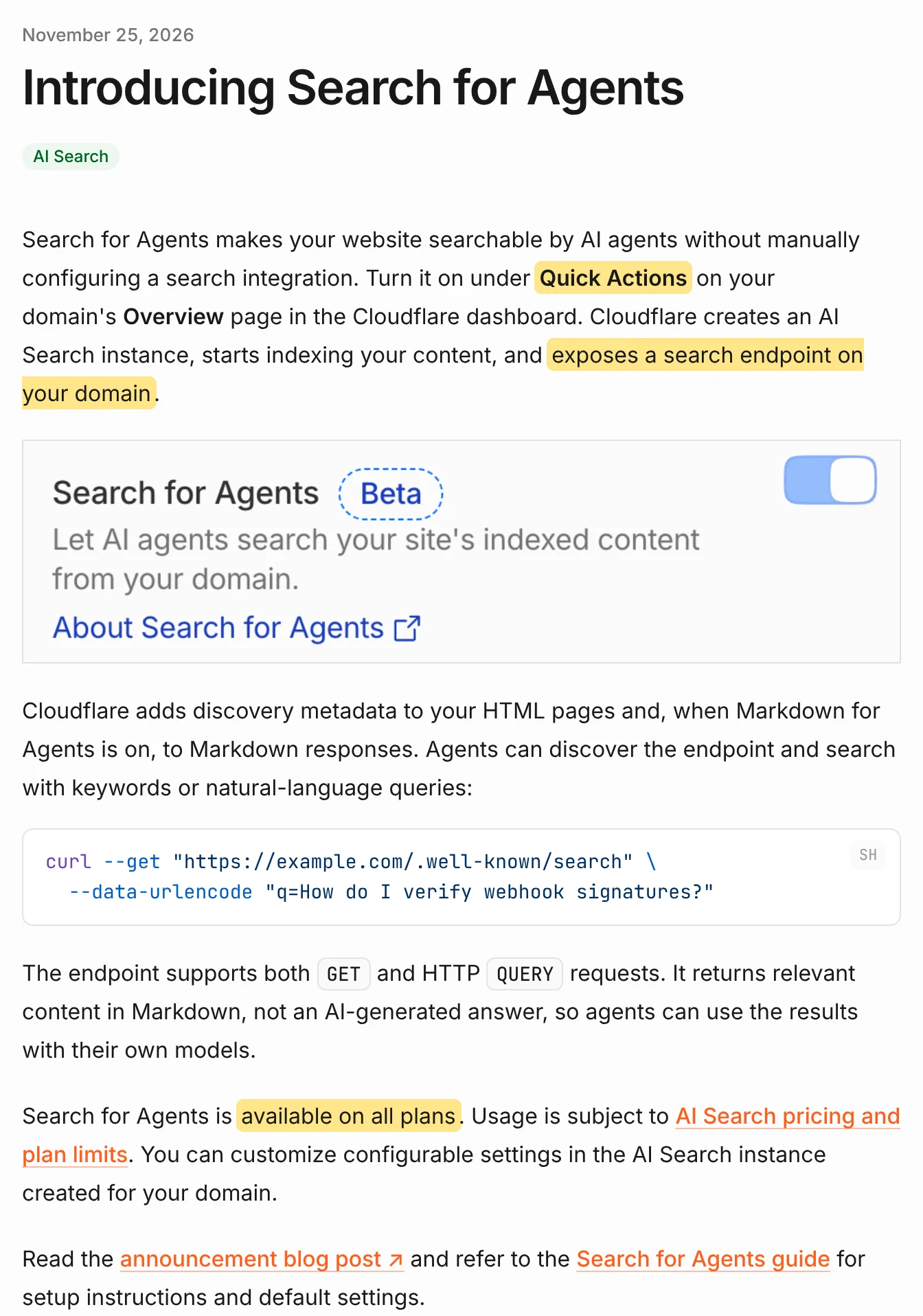
The switch sits under Quick Actions on your domain's Overview page in the Cloudflare dashboard, and the API can set it too. Turning it on creates an AI Search instance named search-for-agents-<ZONE_ID> in the default namespace of your account. Before this, a site owner had to build that instance, wire the endpoint to the domain and tell agents where it was.
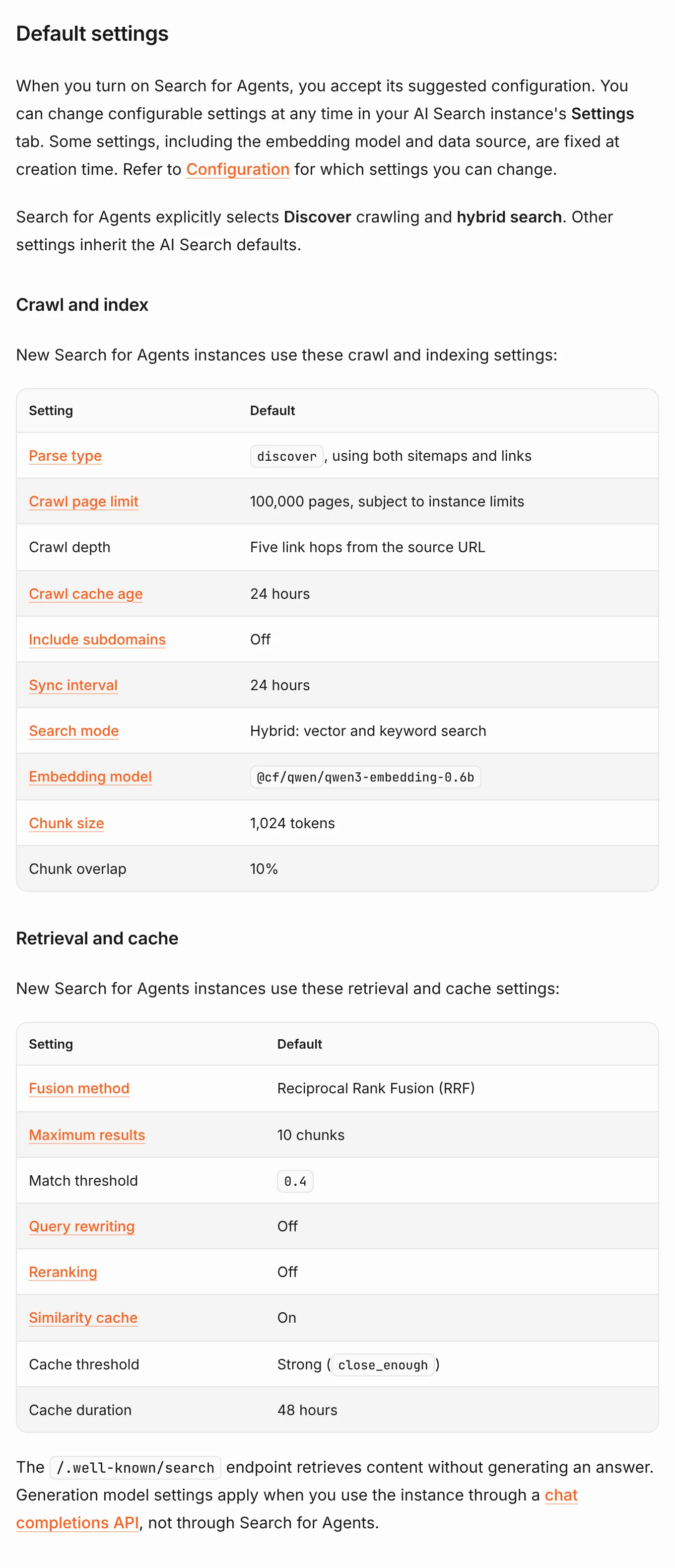
The instance crawls https://<your domain> with the Discover parse type, which finds pages through your sitemaps and the links on your pages, so no sitemap is required. The guide warns: "Only index content that you intend to make publicly searchable." These are the defaults most site owners will want to know:
| Setting | Default | Note |
|---|---|---|
| Pages per crawl | 100,000 | Lower plan limits win |
| Crawl depth | 5 link hops from the homepage | |
| Subdomains | Off | |
| Sync and cache age | Every 24 hours | Discover ignores <lastmod> in your sitemap |
| Search mode | Hybrid, vector plus keyword | |
| Results per query | 10 chunks of about 1,024 tokens | |
| Similarity cache | On, 48 hours | Near-identical queries reuse results |
You can change most settings later in the instance's Settings tab. The embedding model and the data source are fixed when the instance is created.
#How an AI agent finds the endpoint
Cloudflare adds four <meta> tags to the <head> of every HTML page: agent:instructions, agent:endpoint, agent:method and agent:documentation. In the setup guide, the instructions tell the agent to use the search API "instead of crawling individual pages". If you also run Markdown for Agents, an agent that asks for text/markdown gets the same fields as YAML front matter.
The agent then searches with keywords or a question, by GET with a q parameter or with the new HTTP QUERY method:
curl --get "https://example.com/.well-known/search" \
  --data-urlencode "q=How do I verify webhook signatures?"
The response is Markdown: matching passages from your pages with source references and relevance scores. It is retrieved text, "not an AI-generated answer", as the guide puts it, so the agent writes the answer with its own model. In Cloudflare's demo, an OpenCode session found the endpoint on the homepage of Cloudflare's developer docs and answered from it.
Our read: for an agent, one search call replaces fetching and reading several pages. The passages it gets are the ones your index ranks highest, so what the agent quotes depends on Cloudflare's hybrid search as well as on your content.
#What AI Search queries cost from December 1
Usage follows AI Search pricing, and AI Search billing begins on December 1, 2026. Every account gets 5 million ingestion tokens, 10 GB-month of storage, 1,000 semantic queries and 1,000 full-text queries each month. The plan limits come from your Workers plan, separate from your website plan:
| Limit | Workers Free | Workers Paid |
|---|---|---|
| Pages crawled per day | 500 | Unlimited |
| Files per instance | 100,000 | 500,000 with hybrid search |
| Included queries per month | 1,000 semantic, 1,000 full-text | Same |
Past the included usage, ingestion costs $0.75 per million tokens, storage $2.00 per GB-month, semantic and hybrid queries $0.75 per 1,000, and full-text queries $0.10 per 1,000. Our read: the endpoint uses hybrid search by default, so agent queries bill at the $0.75 rate. On Workers Free, a 5,000-page site needs at least 10 days to finish its first crawl.
#How your WAF and robots.txt rules apply to the endpoint
Requests to /.well-known/search remain subject to your AI Crawl Control and Web Application Firewall rules. If you block the Agent category or challenge bots, agents meet the same block at the endpoint.
The index is built by the Cloudflare-AI-Search crawler, which follows robots.txt. Pages that robots.txt disallows are recorded with a blocked_by_robots_txt error and stay out of the index. A robots.txt Content Signals line that sets search or ai-input to no rejects the crawl. Your own Bot Management, WAF and Turnstile rules also apply to the crawler, so a strict setup can leave the index empty.
Our read: robots.txt rules for other bots, such as a GPTBot disallow, do not reach the endpoint. An agent that searches your index gets passages that Cloudflare-AI-Search collected, whatever your rules say to the agent's own crawler.
#What to check
- Open your live robots.txt and look for a
Content-Signalline withsearch=noorai-input=no, and for any rule namingCloudflare-AI-Search. Either one stops pages from reaching the index. - If your Security rules block or challenge bots, add a Skip rule for Bot Detection ID
122933950, as the website data source docs describe. Put it first in the rule order. - In the instance's Settings, under Parser options, add path filters that exclude carts, account pages, internal search results and staging copies. Path patterns match the full URL, so use
**/cart/**, not/cart/**. - After turning it on, view the source of any page and find the
agent:endpointtag, then run thecurlcommand above against your domain. - In the first week of December, open AI, then AI Search, then your instance, and check query and ingestion usage against the included amounts. Our read: since requests pass through your WAF, a rate limiting rule on
/.well-known/searchcaps what an aggressive script can cost you.
#What Cloudflare doesn't say
- How to turn Search for Agents off, and whether that deletes the instance and its stored pages. The guide and the post cover turning it on only.
- Which AI agents read the
agent:meta tags. The only agent shown using them is OpenCode, in Cloudflare's own demo. - Whether queries answered from the similarity cache count as billable queries.
Sources
- Introducing Search for AgentsCloudflare, November 25, 2026
- Introducing Search for Agents (changelog)Cloudflare, November 25, 2026
- Search for AgentsCloudflare Docs, November 25, 2026
- AI Search limits and pricingCloudflare Docs, November 17, 2026
- Website data sourceCloudflare Docs, November 13, 2026
- Parse typesCloudflare Docs, September 17, 2026